
DEVUP Code
Editor actions and code from replies
Work with DEVUP AI from the editor itself: the right-click submenu, Quick Fix and Ctrl+Alt+D bring code into the chat, and Insert, Apply and New file bring code back.
The right-click submenu
- Select the code you want to work on.
- Right-click it and open the DEVUP AI submenu.
- Then pick one: Ask DEVUP AI, Explain, Fix or Add Tests.
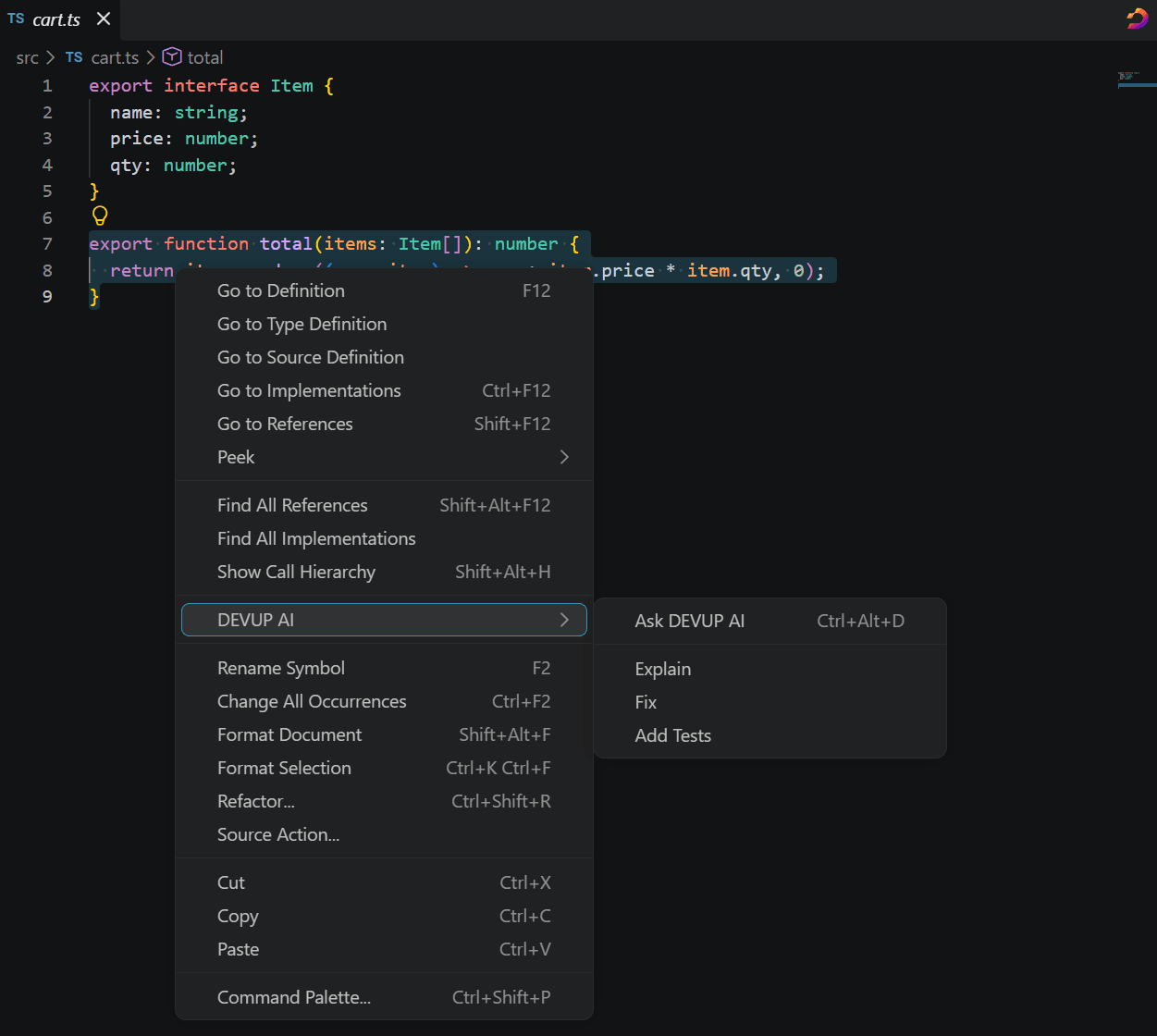
Explain, Fix and Add Tests normally run on the chat's model, and so does Quick Fix. devupai.editorActions.model picks a different one for all four.
Don't need the submenu? Turn off devupai.editor.contextMenu.
Fix with DEVUP AI in Quick Fix
- Put the cursor on code with an error or warning.
- From the Quick Fix menu, pick Fix with DEVUP AI.
- That code and the problems reported on it go to the chat.
devupai.editor.quickFix turns this Quick Fix entry on or off.
Bring code in with Ctrl+Alt+D
With code selected, Ctrl+Alt+D puts that code in the chat. Without a selection, the same keys take you to the message box.
To change the keys, see Commands and shortcuts.
Use the code in a reply
Every finished code block in a reply offers three actions:
- Insert places the code at your cursor, or swaps it in for your selection, as a single edit that one undo reverses.
- Apply opens the change as a diff first. Your file is written only when you accept; rejecting discards the change, and undo reverts an accepted one.
- New file opens the code in a new, unsaved editor.
Two commands in the Command Palette work on a diff under review: DEVUP AI: Accept Change to keep it, DEVUP AI: Reject Change to drop it.
devupai.editor.applyDiff places the diff beside the editor (the default) or in the same tab, and devupai.editor.codeBlockActions shows or hides these actions.
Restricted Mode
In Restricted Mode you can still chat, and DEVUP AI still reads what you attach. It doesn't write to files there, and it doesn't read project rules.
FAQ
Does Apply change my file right away?
No. Apply opens a diff first, and nothing is written until you accept. Reject discards the change; Undo reverts an accepted one.
Which model do Explain, Fix and Add Tests use?
The chat's model, unless you set a separate one in devupai.editorActions.model. That setting covers Fix with DEVUP AI in Quick Fix as well.
Can I undo an Insert?
Yes. Insert lands as one edit, so a single undo takes it back.