
DEVUP Code
Instructions and project rules
Tell DEVUP AI how you work, once: personal instructions follow you into every project, and rule files in a project stay with its code.
Personal instructions
- Open DEVUP AI Settings and go to the Instructions page.
- Write your instructions. You only need to do this once.
- They are sent with every chat, whatever project is open.
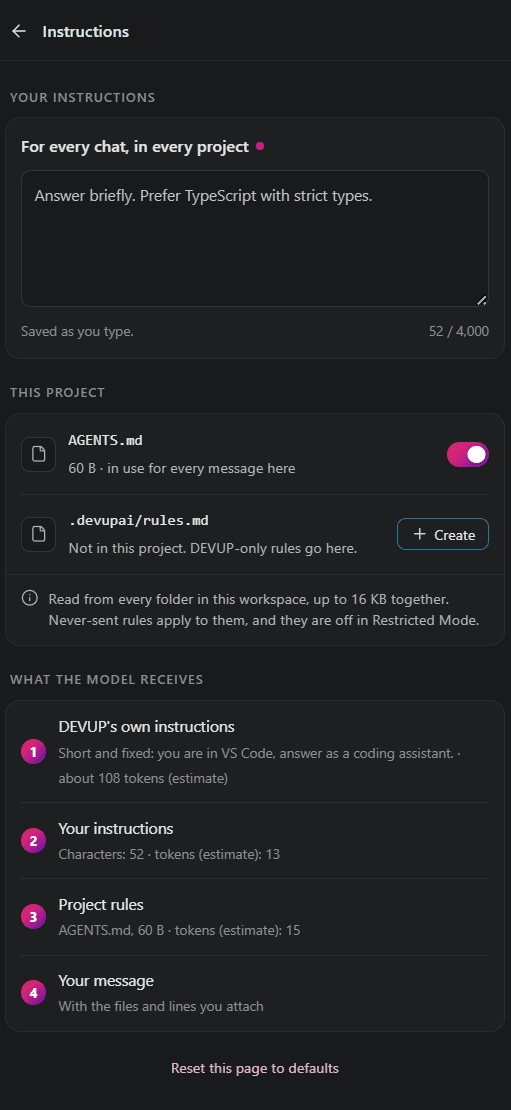
AGENTS.md and .devupai/rules.md
In every workspace folder, DEVUP AI also reads two files at the top level: AGENTS.md and .devupai/rules.md. You can switch either one off.
AGENTS.md
# AGENTS.md

## Project
- TypeScript in strict mode.
- Tests sit next to the code they cover.

## Style
- Small functions with clear names.
- Explain each change in a sentence or two.
In Restricted Mode, project rules are not read.
The order the model receives
The model receives these, in this order:
- DEVUP AI's own instructions
- the reply language
- your personal instructions
AGENTS.md.devupai/rules.md
The Instructions page in DEVUP AI Settings shows everything the model receives, in order.
Longest reply
For each model, you can set the longest reply it may write. The value always stays within that model's own limit.
FAQ
Does DEVUP AI read AGENTS.md?
Yes, along with .devupai/rules.md. Both are read from each folder root, and either one can be switched off.
Do my instructions come before AGENTS.md?
Yes. After DEVUP AI's instructions and the reply language come your instructions, followed by AGENTS.md and finally .devupai/rules.md.
Can I see what the model receives?
Yes. The Instructions page in DEVUP AI Settings lists all of it, in order.
Can DEVUP AI reply in French or Arabic?
Yes. Set the reply language to French or Arabic, or keep the default and it answers in the language you write in.