
DEVUP Code
Chat, models and history
Talk to DEVUP AI in its panel: choose a model, follow each reply as it arrives, copy or edit messages, and come back to earlier chats from History.
Choose and switch models
The model picker opens from the message box. The list is grouped by model maker and shows each maker's logo; type to search it, or narrow it with the capability filters.
You can move to another model at any point, even halfway through a chat. Every reply is labelled with the model that wrote it.
Ask mode
In Ask mode, DEVUP AI answers questions about your code. Attach the files or the selection it should look at; Files and context explains how.
Send, stream and stop
- Enter sends your message by default. Set
devupai.chat.sendWithto send with Ctrl+Enter instead; Shift+Enter always starts a new line. - A Thinking indicator counts the seconds until the reply begins.
- The reply then appears as it is written. To end it early, click Stop or press Esc.
- With a reasoning model, you can follow its thinking live and open it again under the reply later.
devupai.chat.thinkingsets whether it streams open or stays collapsed. - A reply that stopped at its length limit can be continued in place.
- If you switch to another window during a long reply, a notification brings you back when it finishes.
Read a reply
- Replies are formatted, with coloured code and readable math. Each code block has a Copy button.
- Below each reply you see how long it took and how many tokens it used.
- Links in a reply ask you to confirm the address before they open.
To put code from a reply into your files, see Editor actions.
Copy, edit and regenerate
- Copy a reply, or copy a message you sent.
- Edit one of your messages and send it again.
- Regenerate the last reply, or retry after an error.
- Ask another model for the last reply; your default model doesn't change.
History and new chats
Chats are saved on this computer. Open History to search them, and to pin, rename, delete or reopen a chat.
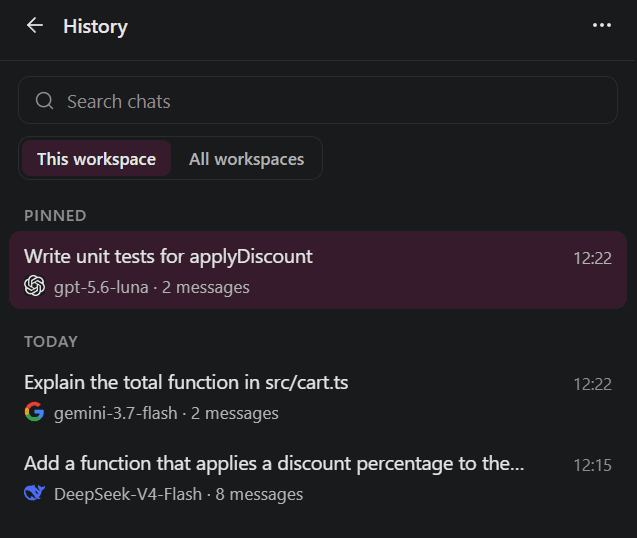
To stop saving new chats, turn off devupai.history.save. To keep only your latest chats, choose a smaller number in devupai.history.keep. Pinned chats are always kept.
To start over, open a new chat with one click. The chat you leave stays in History.
FAQ
Can I switch to another model partway through a chat?
Yes. Choose another model from the message box at any point; each reply names the model that wrote it.
How do I stop a reply?
Click Stop or press Esc while it is being written.
Can I get the last answer from another model?
Yes. Regenerate the last reply with a different model; your default model stays the same.
Where is my chat history saved?
Chats are saved on this computer. History lets you search, pin, rename, delete and reopen them.