
Integrations
Aider
Aider is an AI pair programmer that runs in your terminal and edits files in your git repo. Connect it to DEVUP AI through its OpenAI-compatible settings.
Prerequisites
- Python installed on your system.
- git installed on your system.
- A DEVUP AI API key from https://devupai.com/dashboard/api-keys.
Install
Install Aider using the official installer:
python -m pip install aider-install
aider-install
If aider-install or aider is not found on Windows, the pip Scripts folder or %USERPROFILE%\.local\bin is not on your PATH; open a new terminal or add the folder to PATH.
Set the environment variables
Set your DEVUP AI endpoint and API key in your terminal session:
$env:OPENAI_API_BASE = "https://api.devupai.com/v1"
$env:OPENAI_API_KEY = "your-key"
These apply to the current terminal session.
Start Aider
Run the following command inside a git repository:
aider --model openai/deepseek-ai/DeepSeek-V4-ProThe openai/ prefix routes requests through Aider's OpenAI-compatible settings.

Run your first task
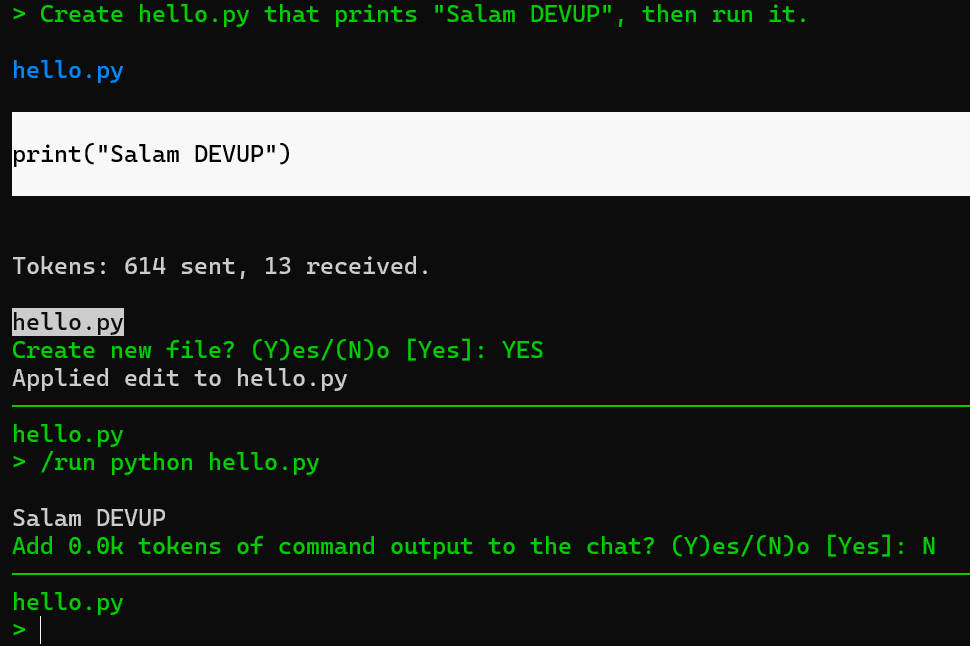
Enter your task prompt in the Aider prompt:
Create hello.py that prints "Salam DEVUP", then run it.Aider asks before creating the file. Run it with /run python hello.py.
Useful options
| Option | Effect |
|---|---|
| --no-auto-commits | Aider edits files without committing them |
| --no-show-model-warnings | skips the model-information check at startup |
Choosing a model
Prefix any catalog model ID with openai/. For code edits, choose models whose catalog entry supports tool calling or strong coding performance. Browse supported models in Models.
Troubleshooting
- "Unknown context window size and costs"Expected for models Aider does not list; Aider uses default values. Use --no-show-model-warnings to skip the check.
- Authentication error (401)Set OPENAI_API_KEY in the same terminal that starts Aider, with no Bearer prefix.
- Model not foundKeep the openai/ prefix and copy the rest exactly from the catalog.