
Integrations
Cursor
Cursor is an AI code editor. Add DEVUP AI models to it as custom models through its OpenAI API key and base URL settings.
Prerequisites
- Cursor on a paid plan
- A DEVUP AI API key from https://devupai.com/dashboard/api-keys
Tip: Create a separate DEVUP AI key for Cursor so you can revoke it independently.
Add a custom model
In Settings → Models, choose Add Custom Model and enter the exact catalog ID, e.g. deepseek-ai/DeepSeek-V4-Pro, then turn on its toggle.
Set your API key and base URL
Under API Keys, turn on OpenAI API Key and paste the key. Turn on Override OpenAI Base URL and enter https://api.devupai.com/v1.
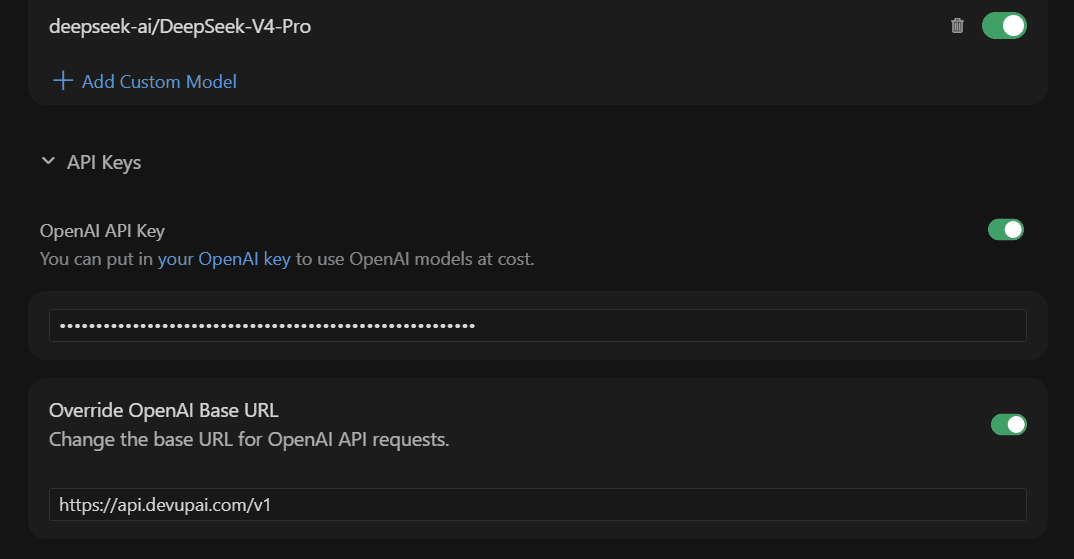
Select the model
Choose the custom model in the chat model picker.
Plan requirement
Custom models require a paid Cursor plan. On the Free plan Cursor shows "Named models unavailable — Free plans can only use Auto."
Switching back
Turn off Override OpenAI Base URL to send Cursor's OpenAI API requests to OpenAI again.
Choosing a model
Use exact catalog IDs as custom model names. See Models.
Troubleshooting
- "Named models unavailable"Your Cursor plan does not allow custom models; a paid plan is required.
- Authentication error (401)Paste the DEVUP AI key into the OpenAI API Key field without a Bearer prefix, and make sure the toggle is on.
- Model not foundThe custom model name must match the catalog ID exactly.