
Integrations
Flowise
Flowise is an open-source visual builder for LLM apps. Connect it to DEVUP AI to run chatbots, agents and document Q&A on DEVUP AI models, then call them from your apps or your website.
Requirements
- Node.js 24;
- a DEVUP AI API key from https://devupai.com/dashboard/api-keys.
Install and start Flowise
mkdir flowise-app
cd flowise-app
npm init -y
npm install flowise
npx flowise start
Open http://localhost:3000.
Optional environment variables
| Variable | Purpose |
|---|---|
| DATABASE_PATH | folder for the Flowise database |
| SECRETKEY_PATH | folder for Flowise's encryption key |
| LOG_PATH | folder for logs |
| BLOB_STORAGE_PATH | folder for uploaded files |
| DISABLE_FLOWISE_TELEMETRY | true turns telemetry off |
Add your DEVUP AI key as an OpenAI API credential
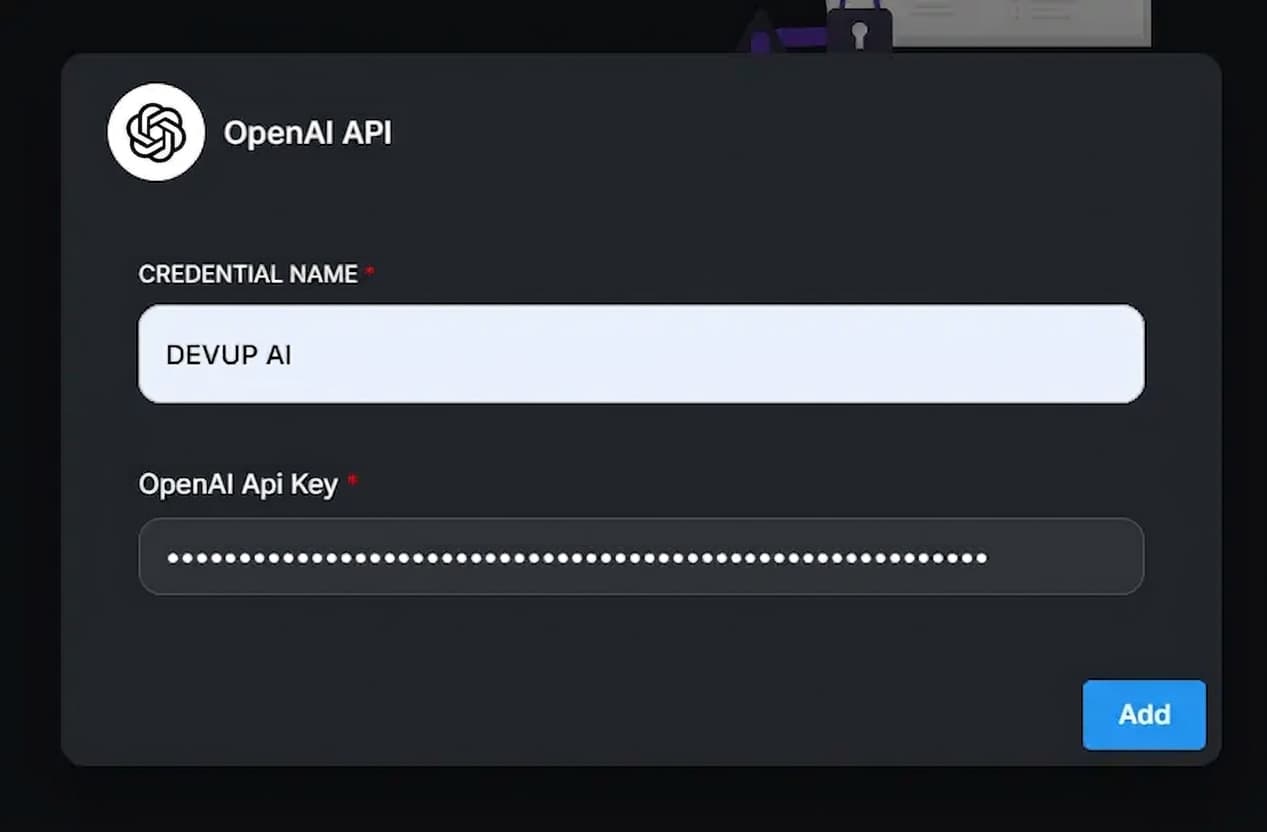
- Open Credentials and click Add Credential.
- Choose OpenAI API.
- Name it DEVUP AI and paste your DEVUP AI key into OpenAI Api Key.
Use DEVUP AI models with the OpenAI Custom Model node
Add OpenAI Custom Model to a flow and fill in:
OpenAI Custom Model settings
| Setting | Value |
|---|---|
| Connect Credential | DEVUP AI |
| Model Name | a DEVUP AI catalog ID, such as deepseek-ai/DeepSeek-V4-Pro |
| Base Path (Additional Parameters) | https://api.devupai.com/v1 |
| Streaming | on |
https://api.devupai.com/v1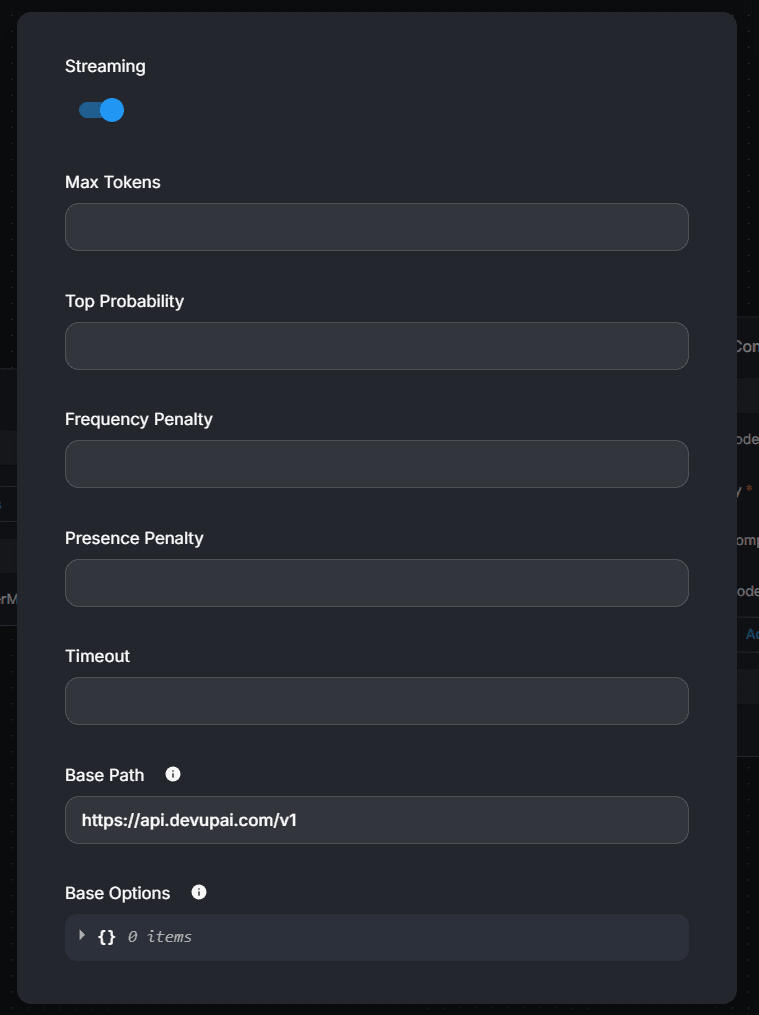
Build a chatbot with memory
Connect OpenAI Custom Model and Buffer Memory to a Conversation Chain, save, and open the chat.
Reply with exactly: Salam DEVUP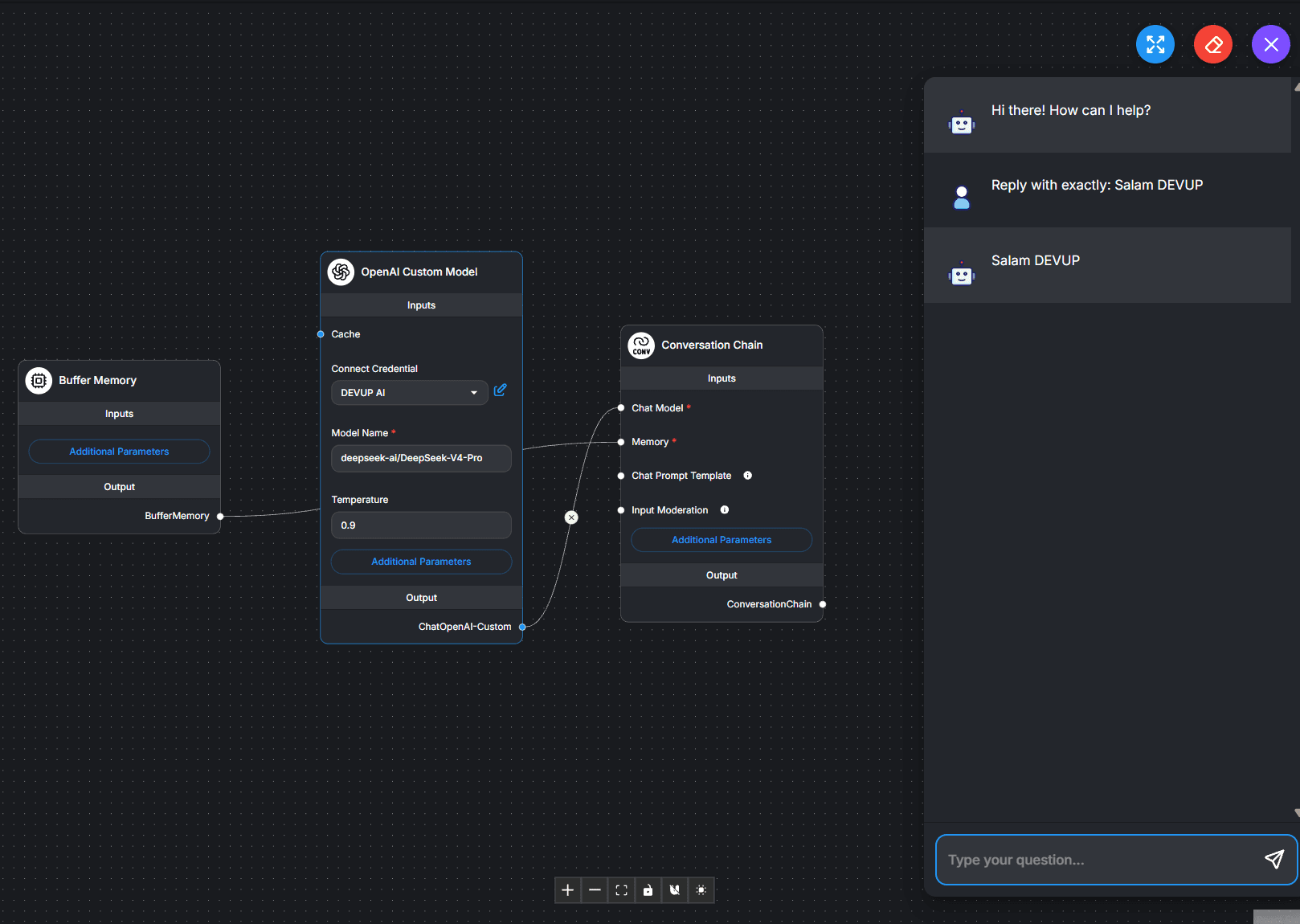
Build an agent that calls tools
Connect OpenAI Custom Model, Buffer Memory and the Calculator tool to a Tool Agent.
What is 12 multiplied by 34? Use the calculator tool.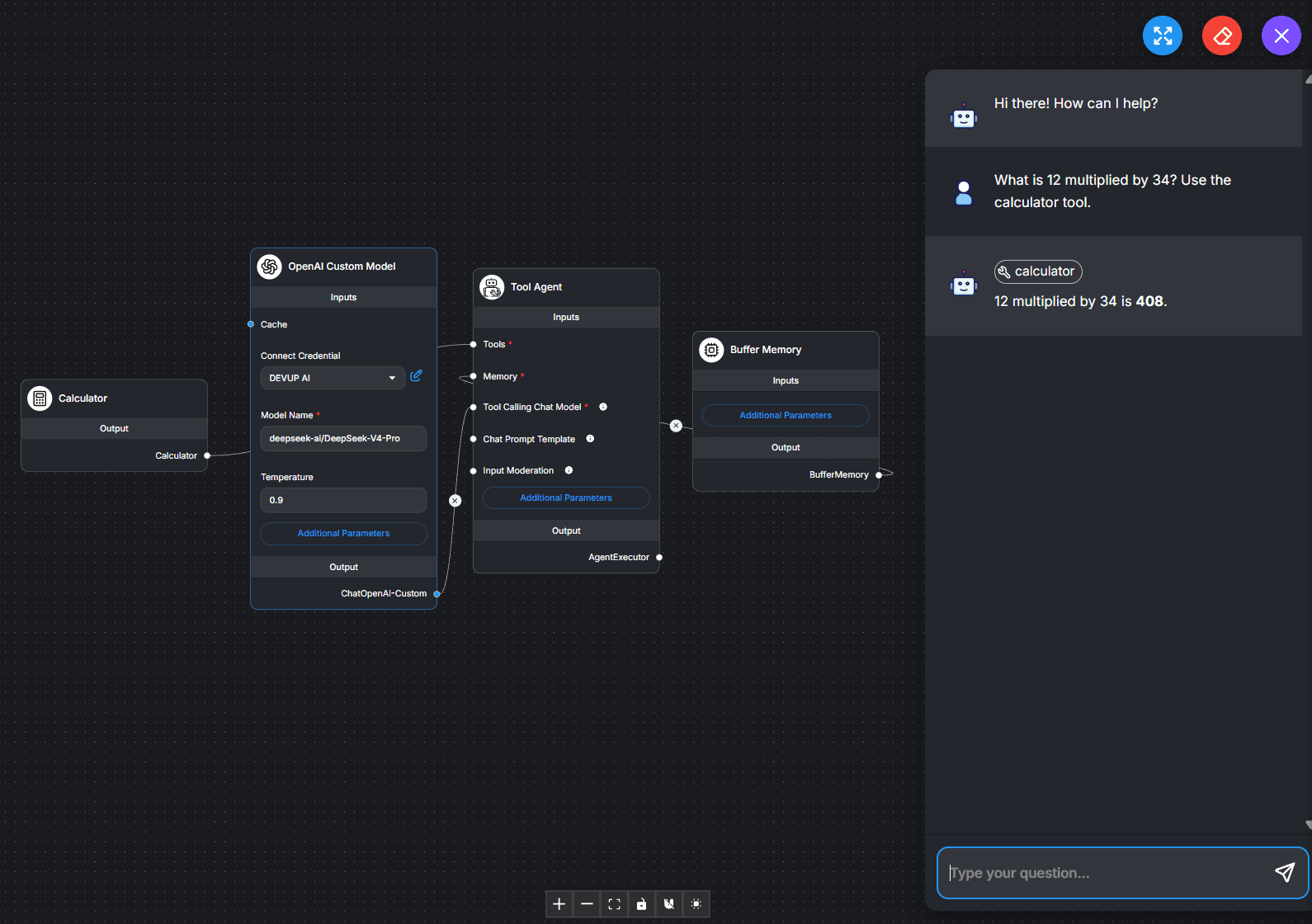
Flowise shows the calculator tool above the answer.
Answer questions from your documents (RAG)
- Add OpenAI Custom Embedding with your DEVUP AI credential, Model Name BAAI/bge-m3, and Base Path https://api.devupai.com/v1.
- Connect Text File and the embedding to an In-Memory Vector Store, and connect the vector store and OpenAI Custom Model to a Conversational Retrieval QA Chain.
- Upload your file to Text File, save, and click Upsert Vector Database.
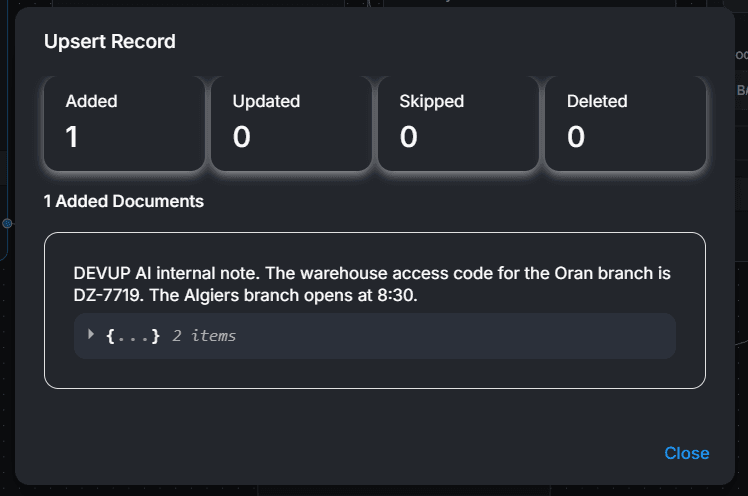
Try it with this file:
DEVUP AI internal note.
The warehouse access code for the Oran branch is DZ-7719.
The Algiers branch opens at 8:30.What is the warehouse access code for the Oran branch?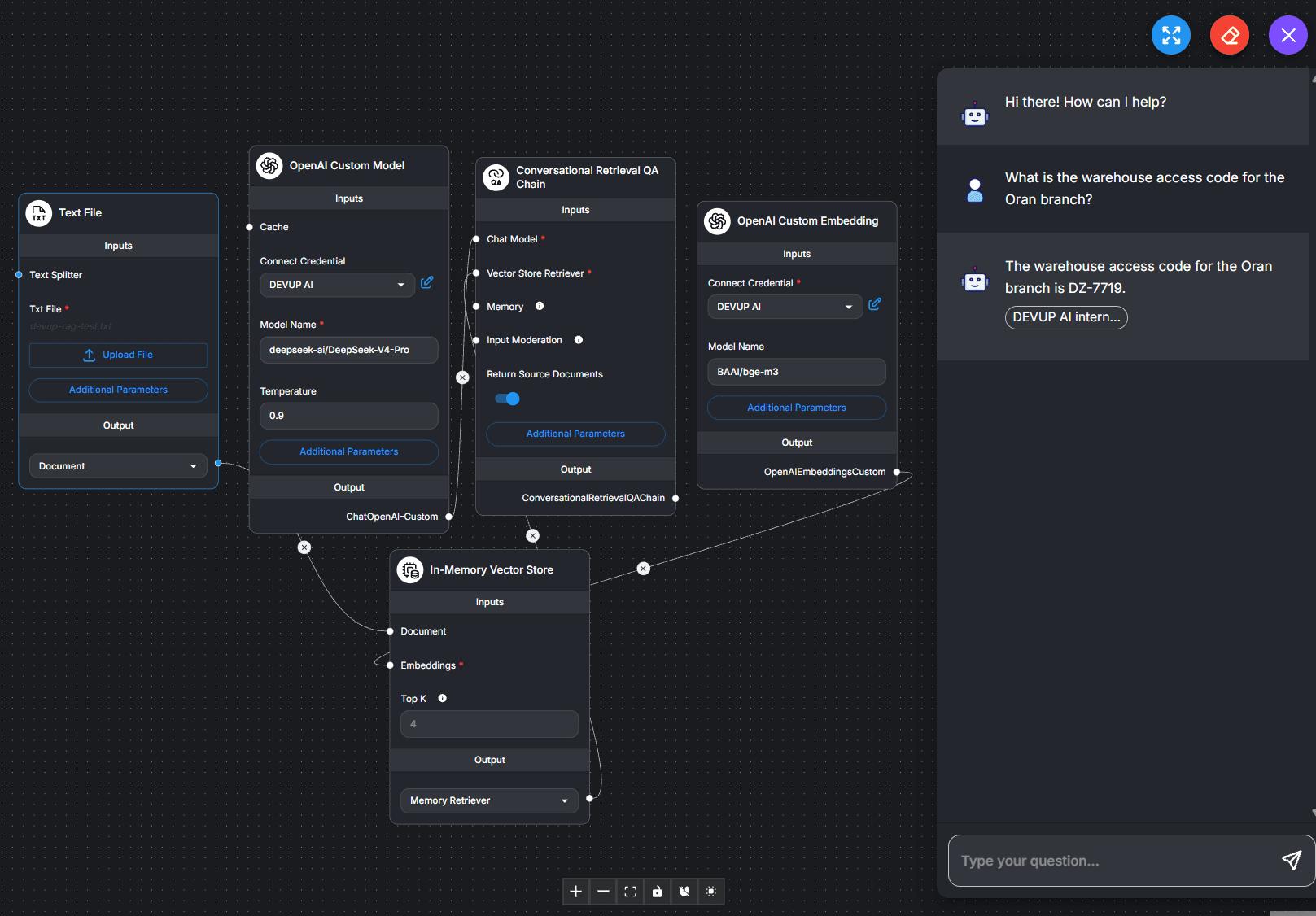
Import the ready-made flows
- In Chatflows, click Add New, then open Settings and choose Load Chatflow.
- Select the downloaded file.
- Pick your DEVUP AI credential in each OpenAI node, then save.
The files contain no credentials; each person selects their own after loading.
Call your flow from any app
Open the </> button on a saved flow to get its ID and ready-made Python, JavaScript and cURL snippets. From PowerShell:
$id = "YOUR_CHATFLOW_ID"
$r = Invoke-RestMethod -Uri "http://localhost:3000/api/v1/prediction/$id" -Method Post -ContentType "application/json" -Body '{"question":"Reply with exactly: Salam DEVUP"}'
$r.text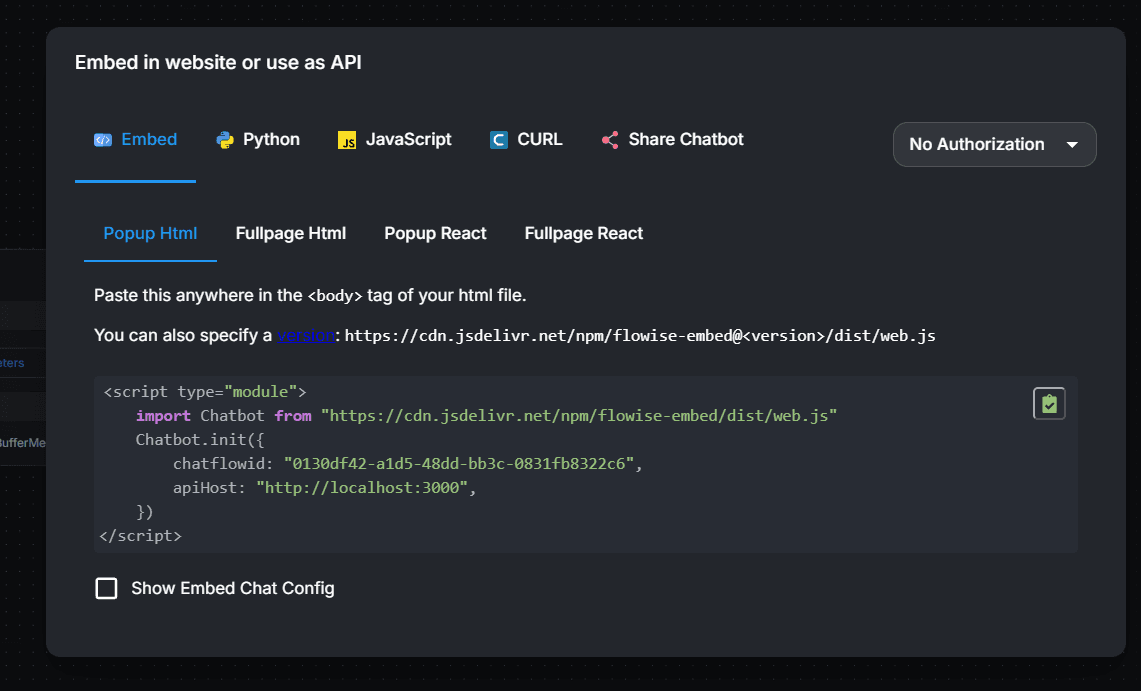
Add the chatbot to your website
Paste this into your page, with your flow ID and your Flowise address:
<script type="module">
  import Chatbot from "https://cdn.jsdelivr.net/npm/flowise-embed/dist/web.js"
  Chatbot.init({ chatflowid: "YOUR_CHATFLOW_ID", apiHost: "http://localhost:3000" })
</script>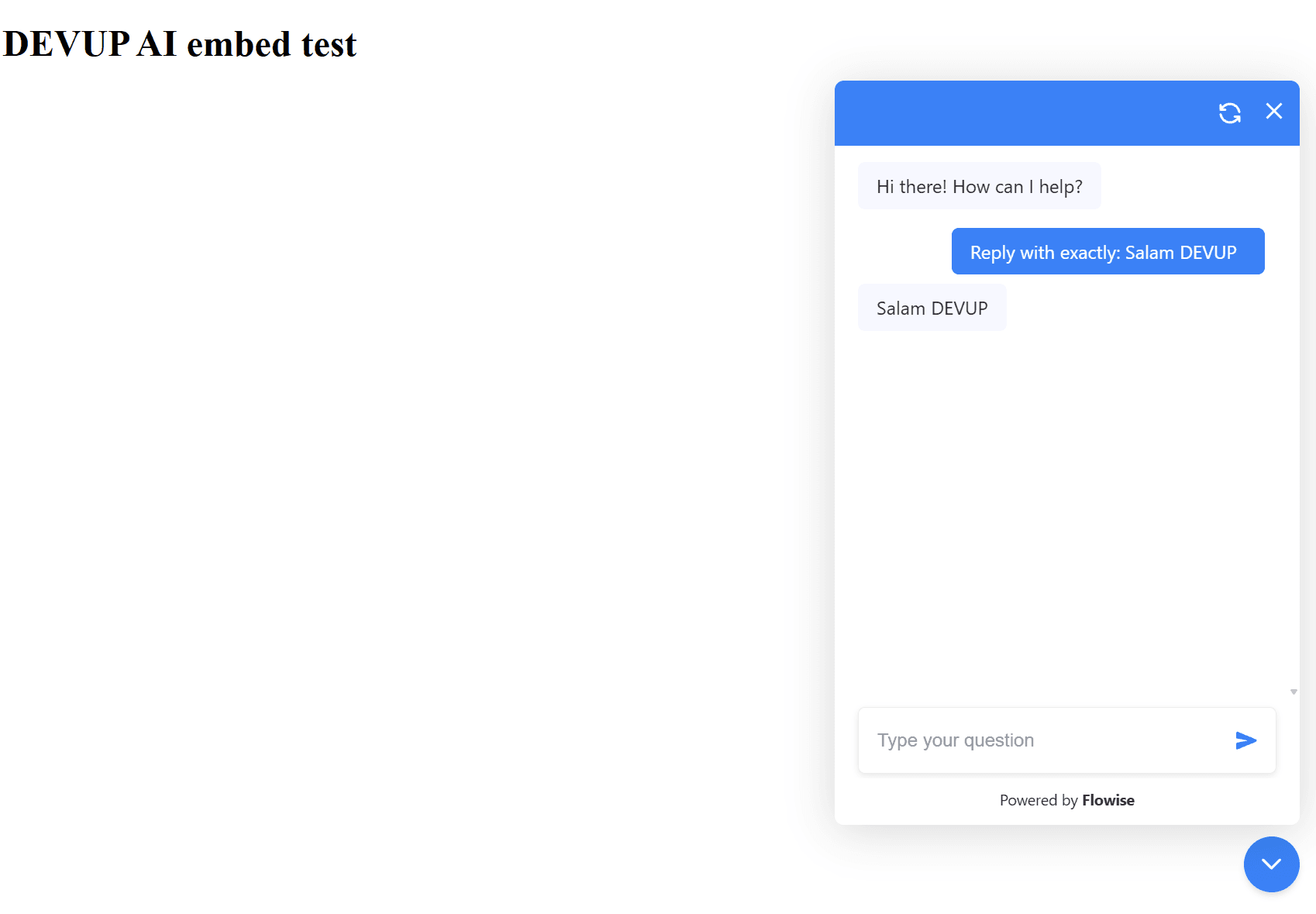
An embedded chatbot sends no API key, so keep its flow on No Authorization.
Protect a flow with a Flowise API key
- Create a key under API Keys. It needs no extra permissions to call a flow.
- Open the flow's </> button and select the key instead of No Authorization.
- Send the key as a Bearer token.
$id = "YOUR_CHATFLOW_ID"
$r = Invoke-RestMethod -Uri "http://localhost:3000/api/v1/prediction/$id" -Method Post -ContentType "application/json" -Headers @{ Authorization = "Bearer YOUR_FLOWISE_API_KEY" } -Body '{"question":"Reply with exactly: Salam DEVUP"}'
$r.text
Choosing models
Use exact catalog IDs: a chat model in OpenAI Custom Model, and BAAI/bge-m3 in OpenAI Custom Embedding. Agents need a model with tool calling. See the Models catalog, Embeddings guide, and Tool Calling guide.
Troubleshooting
- npm install fails on Windows while building better-sqlite3:
Add this to the package.json of your Flowise folder, delete node_modules, and run npm install again:
json"overrides": { "better-sqlite3": "12.11.1" } - The reply is "Unauthorized":The flow has a Flowise API key. Send it as Authorization: Bearer <key>, or set the flow back to No Authorization for an embedded chatbot.
- The credential is empty after loading a template:Flowise does not export credentials. Pick DEVUP AI in each OpenAI node and save.
FAQ
Does Flowise work with DEVUP AI?
Yes. Add an OpenAI API credential with your DEVUP AI key, then use OpenAI Custom Model with Base Path https://api.devupai.com/v1.
Can Flowise answer questions from my documents with DEVUP AI?
Yes. Use OpenAI Custom Embedding with BAAI/bge-m3 and the same Base Path, then upsert your files into a vector store.
How is Flowise usage billed on DEVUP AI?
Every chat and embedding request is a regular DEVUP AI API call, metered in Algerian Dinar on your account.
Can I add a Flowise chatbot to my website?
Yes. Copy the snippet from the Embed tab of the flow's </> button and paste it into your page.
How do I protect my flow's API?
Create a Flowise API key, select it on the flow, and send it as a Bearer token. An embedded chatbot needs its flow on No Authorization.
Are there ready-made flows?
Yes. Download the chatbot, agent or document Q&A flow from this page, load it in Flowise, and pick your DEVUP AI credential.
Related integrations
- n8n: Workflow automation with AI agents.
- Open WebUI: Self-hosted chat for your team.
- LangChain: Chains and agents with LangChain.
- LlamaIndex: Retrieval and RAG pipelines in Python.