
Integrations
Codex CLI
Codex CLI is OpenAI's coding agent for the terminal. Add DEVUP AI as a model provider in its config file, and Codex runs on DEVUP AI models, including DeepSeek-V4-Pro and gpt-5.3-codex.
Requirements
- Node.js with npm;
- a DEVUP AI API key from https://devupai.com/dashboard/api-keys. Create a dedicated key for Codex so you can revoke it on its own.
Install Codex CLI
npm install -g @openai/codex
codex --version
Set your API key
Codex reads the key from the environment variable named in env_key. Set it in the terminal where you run Codex:
PowerShell
$env:DEVUP_API_KEY = "YOUR_DEVUP_API_KEY"Bash
export DEVUP_API_KEY="YOUR_DEVUP_API_KEY"Add DEVUP AI to config.toml
Put this in your Codex config file: %USERPROFILE%\.codex\config.toml on Windows, ~/.codex/config.toml on macOS and Linux.
model = "deepseek-ai/DeepSeek-V4-Pro"
model_provider = "devupai"
web_search = "disabled"

[model_providers.devupai]
name = "DEVUP AI"
base_url = "https://api.devupai.com/v1"
env_key = "DEVUP_API_KEY"
wire_api = "responses"
Settings
| Setting | Value | What it does |
|---|---|---|
| model | deepseek-ai/DeepSeek-V4-Pro | The model for new sessions. Any DEVUP AI catalog ID works. |
| model_provider | devupai | Selects the provider defined below. |
| web_search | disabled | Runs Codex without its hosted web search tool. |
| base_url | https://api.devupai.com/v1 | The DEVUP AI API. |
| env_key | DEVUP_API_KEY | The environment variable that holds your key. |
| wire_api | responses | Codex talks to DEVUP AI through /v1/responses. |
On Windows, also add this table so Codex can run commands and edit files:
[windows]
sandbox = "elevated"
Run your first prompt
codex exec --skip-git-repo-check "Reply with exactly: Salam DEVUP"It prints Salam DEVUP. --skip-git-repo-check lets Codex run outside a Git repository.
Use Codex interactively
Start Codex in your project folder:
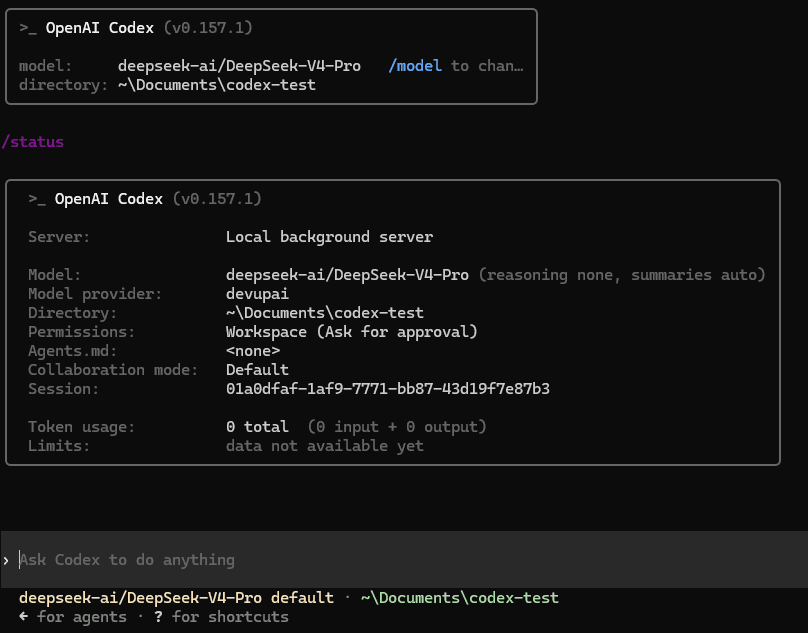
codexType /status to see the model and the provider:
Let Codex edit files
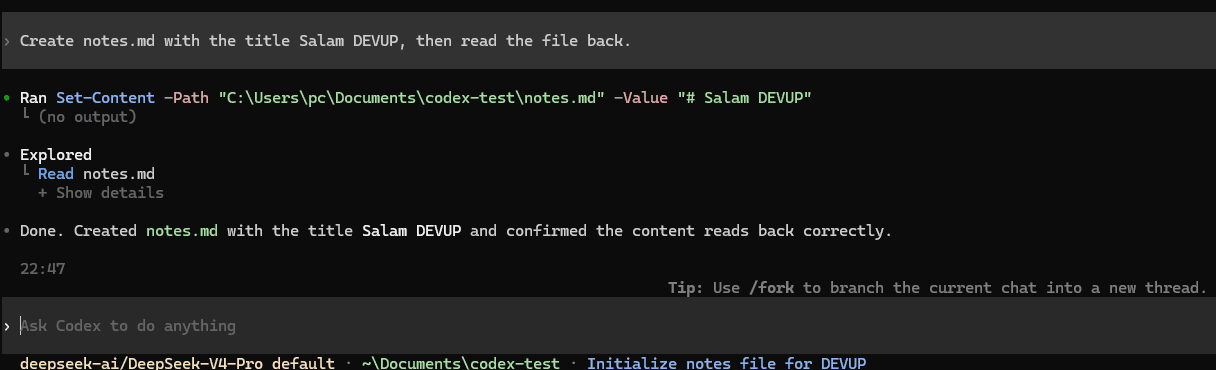
Codex runs commands and edits files in the folder you start it in. For a one-off task:
codex exec --skip-git-repo-check --sandbox workspace-write "Create a file named hello.txt that contains exactly: Salam DEVUP. Then read the file back and tell me its content."In an interactive session, ask in plain words:
Choose a model
Change model in config.toml, or pass -m for one run:
codex exec --skip-git-repo-check -m openai/gpt-5.3-codex "Reply with exactly: Salam DEVUP"Use a catalog ID with tool calling, such as deepseek-ai/DeepSeek-V4-Pro or openai/gpt-5.3-codex. See Models.
Troubleshooting
- Commands are rejected with blocked by policy on Windows:Add the [windows] table from the configuration above, then start Codex again.
- Codex stops with a message about web_search:Add web_search = "disabled" to config.toml, as in the configuration above.
- Codex warns Model metadata ... not found:Codex shows this for model IDs outside its built-in list. Requests continue normally.
FAQ
Does Codex CLI work with DEVUP AI?
Yes. Add a devupai provider to config.toml with base_url https://api.devupai.com/v1, env_key DEVUP_API_KEY and wire_api responses, then set model_provider to devupai.
Which models can I use in Codex?
Any DEVUP AI chat model with tool calling, such as deepseek-ai/DeepSeek-V4-Pro or openai/gpt-5.3-codex. Set model in config.toml, or pass -m for one run.
How is Codex usage billed on DEVUP AI?
Every request from Codex is a regular DEVUP AI API call, metered in Algerian Dinar on your account.
Where does Codex keep my DEVUP AI key?
Codex reads it from the environment variable named in env_key, DEVUP_API_KEY. The key is not written in config.toml.
Can Codex edit files and run commands on DEVUP AI models?
Yes. With the workspace-write sandbox, Codex creates, reads and changes files in your project. On Windows, add the [windows] table from the configuration.
Do I need a ChatGPT account?
No. Codex uses your DEVUP AI key from DEVUP_API_KEY.