
Integrations
Dify
Dify builds chatflows, agents and knowledge bases in a visual editor. Add DEVUP AI models through the OpenAI-API-compatible plugin, and your apps run on DEVUP AI models and DEVUP AI embeddings.
Requirements
- A Dify workspace.
- a DEVUP AI API key from https://devupai.com/dashboard/api-keys. Create a dedicated key for Dify so you can revoke it on its own. Dify encrypts the key before storing it.
Install the OpenAI-API-compatible plugin
| Step | Where | What to do |
|---|---|---|
| 1 | Marketplace | Search for OpenAI-API-compatible and install the plugin by langgenius. |
| 2 | Integrations | Find OpenAI-API-compatible in your model providers. |
Add DeepSeek-V4-Pro as a chat model
On OpenAI-API-compatible, choose Add Model and enter these values. Leave every other field at its default.
| Field | Value |
|---|---|
| Model Name | deepseek-ai/DeepSeek-V4-Pro |
| Model Type | LLM |
| Authorization Name | DEVUP AI |
| Model display name | DeepSeek V4 Pro (DEVUP AI) |
| API Key | your DEVUP AI key |
| API Base URL | https://api.devupai.com/v1 |
| model name for API endpoint | deepseek-ai/DeepSeek-V4-Pro |
| Model context size | 1048576 |
| Upper bound for max tokens | 32768 |
| Function Call Type | Tool Call |
| Stream function calling | Support |
Save the model. It appears as DeepSeek V4 Pro (DEVUP AI) in every model picker.
Build a chatbot
Create an app from the Chatflow Basic: Chatbot template, open the LLM node and choose DeepSeek V4 Pro (DEVUP AI). In Preview, the chatbot answers on DEVUP AI and keeps the conversation, so a follow-up question sees the earlier messages. Each run shows the LLM node's token count.
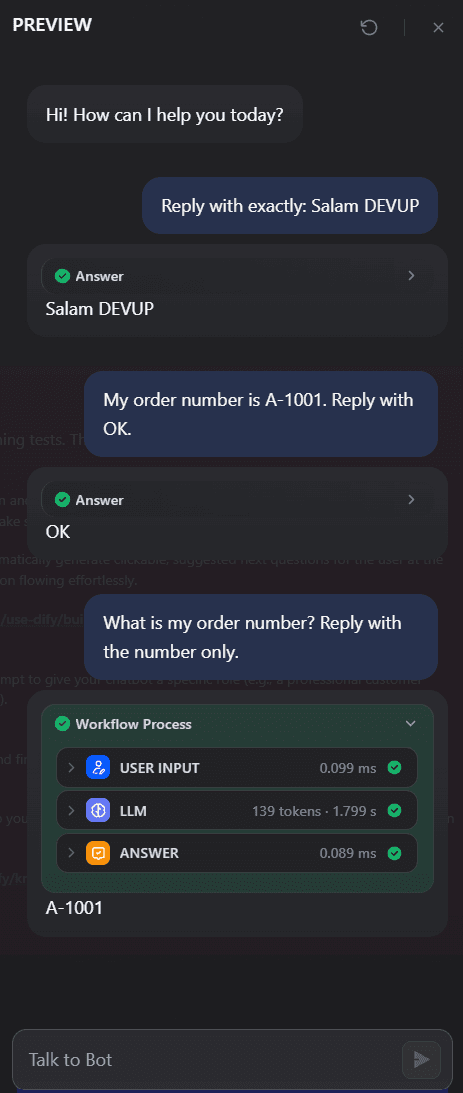
A Dify chatflow on DeepSeek V4 Pro (DEVUP AI) answering a follow-up question from the conversation.
Give an agent tools
Create an Agent app, choose DeepSeek V4 Pro (DEVUP AI), and add a tool, for example Dify's built-in Current Time. Ask a question the tool answers: the agent calls the tool, shows the request and the response, and answers from the result. Tool calls need Function Call Type set to Tool Call on the model.
Add BGE-M3 for embeddings
Add a second model on OpenAI-API-compatible for knowledge bases:
| Field | Value |
|---|---|
| Model Name | BAAI/bge-m3 |
| Model Type | Text Embedding |
| Authorization Name | DEVUP AI |
| Model display name | BGE-M3 (DEVUP AI) |
| API Key | your DEVUP AI key |
| API Base URL | https://api.devupai.com/v1 |
| model name for API endpoint | BAAI/bge-m3 |
Leave Model max chunks per batch and Model context size at their defaults.
Create a knowledge base
| Step | Where | What to do |
|---|---|---|
| 1 | Knowledge | Choose Create a ready-to-use knowledge base and upload your documents. |
| 2 | Index Method | Choose High Quality. |
| 3 | Embedding Model | Choose BGE-M3 (DEVUP AI). |
| 4 | Retrieval Setting | Choose Vector Search, then Save & Process. |
In Retrieval Testing, a question returns the matching passages ranked by score, with the best match first.
Answer from your documents
Add the knowledge base to your Agent app. The agent searches it when a question needs it and answers from the retrieved passages.
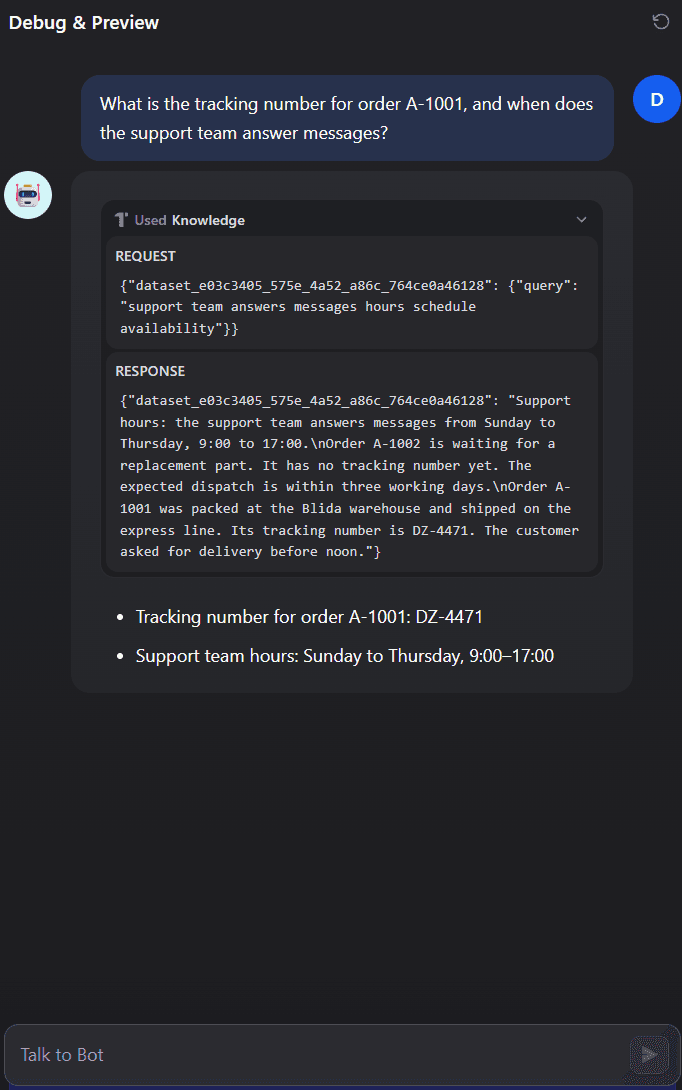
A Dify agent on DeepSeek V4 Pro (DEVUP AI) answering from its knowledge base, embedded with BGE-M3 (DEVUP AI).
Troubleshooting
- Answers are cut short or long chats fail:Dify's default Model context size and Upper bound for max tokens are 4096. Set them to 1048576 and 32768 for DeepSeek-V4-Pro.
- The agent does not call its tools:Set Function Call Type to Tool Call on the model in OpenAI-API-compatible.
FAQ
Does Dify work with DEVUP AI?
Yes. Install the OpenAI-API-compatible plugin, add DEVUP AI models with the API Base URL https://api.devupai.com/v1 and your DEVUP AI key, and choose them in your apps. Chatflows, agents and knowledge bases then run on DEVUP AI.
Which Dify plugin do I use?
The OpenAI-API-compatible plugin by langgenius, from the Dify Marketplace. Each DEVUP AI model is added to it with Add Model.
Can Dify agents call tools on DEVUP AI models?
Yes. Set Function Call Type to Tool Call and Stream function calling to Support on the model. Agents then call their tools and answer from the results.
Can I use DEVUP AI embeddings for a knowledge base?
Yes. Add BAAI/bge-m3 as a Text Embedding model, then choose BGE-M3 (DEVUP AI) as the embedding model of a High Quality knowledge base.
What context size and max tokens should I enter for DeepSeek-V4-Pro?
Model context size 1048576 and Upper bound for max tokens 32768.
How is my API key stored in Dify?
Dify encrypts the key before storing it. Use a dedicated DEVUP AI key for Dify so you can revoke it on its own.
Related integrations
- Flowise: Build chatbots, agents and document Q&A in Flowise on DEVUP AI models.
- n8n: Run n8n AI Agent workflows on DEVUP AI with an OpenAI credential and a custom Base URL.
- Open WebUI: Run Open WebUI on DEVUP AI: chat with the catalog and answer questions from your documents.
- LangGraph: Build stateful LangGraph agents with tool loops, streaming and memory on DEVUP AI models.