
Integrations
n8n
n8n is a workflow automation platform with built-in AI Agent nodes. Point its OpenAI credential at DEVUP AI and your workflows run on DEVUP AI models, with tools and the full model catalog.
Requirements
- a running n8n instance;
- a DEVUP AI API key from https://devupai.com/dashboard/api-keys.
Add DEVUP AI as an OpenAI credential in n8n
- Create a new credential and choose OpenAI (not Azure OpenAI).
- Paste your DEVUP AI key into API Key and leave Organization ID empty.
- Replace the Base URL with https://api.devupai.com/v1 and save.
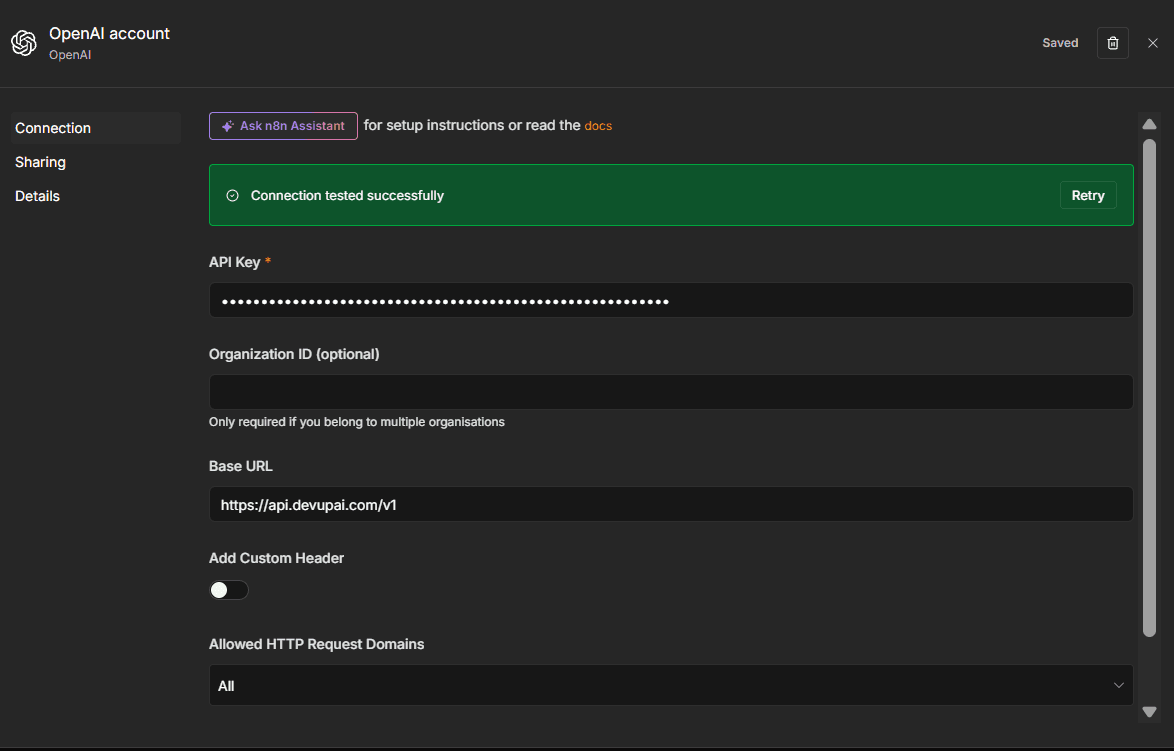
Credential fields
| Field | Value | Why |
|---|---|---|
| API Key | your DEVUP AI key | Authenticates every request. |
| Organization ID | empty | Not used by DEVUP AI. |
| Base URL | https://api.devupai.com/v1 | Sends requests to DEVUP AI instead of the default endpoint. |
| Allowed HTTP Request Domains | Specific Domains: api.devupai.com | The key can only be sent to DEVUP AI. |
Use Responses API: keep the default
New OpenAI Chat Model nodes have Use Responses API switched on. DEVUP AI works with it on or off, so you can keep the default.
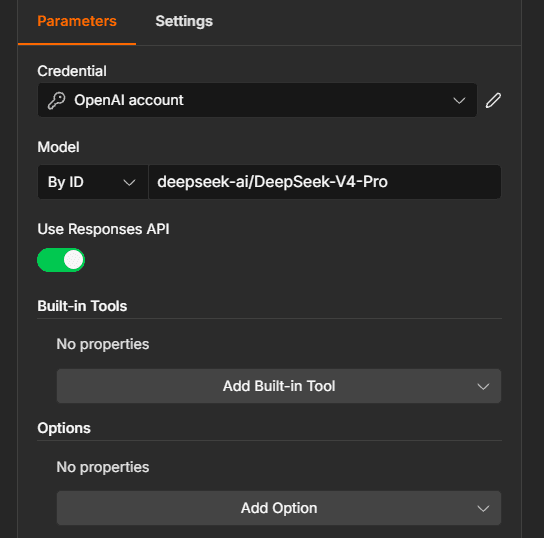
Build an AI Agent workflow with DEVUP AI
- Add a Chat Trigger and an AI Agent.
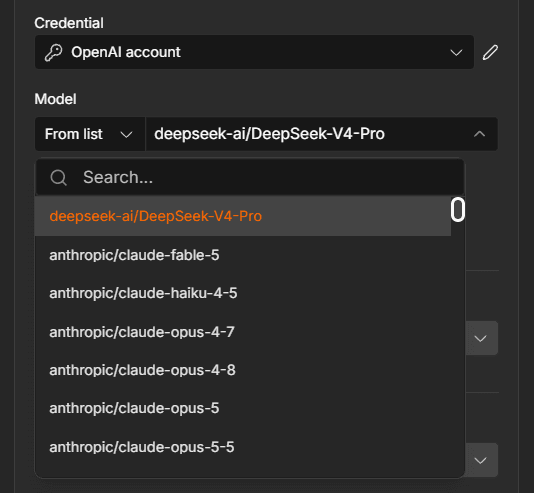
- Attach an OpenAI Chat Model with your DEVUP AI credential, and pick a model under Model → From list.
- Attach the Calculator tool.
- Click Open chat below the canvas and send the test prompt.
What is 12 multiplied by 34? Use the calculator tool.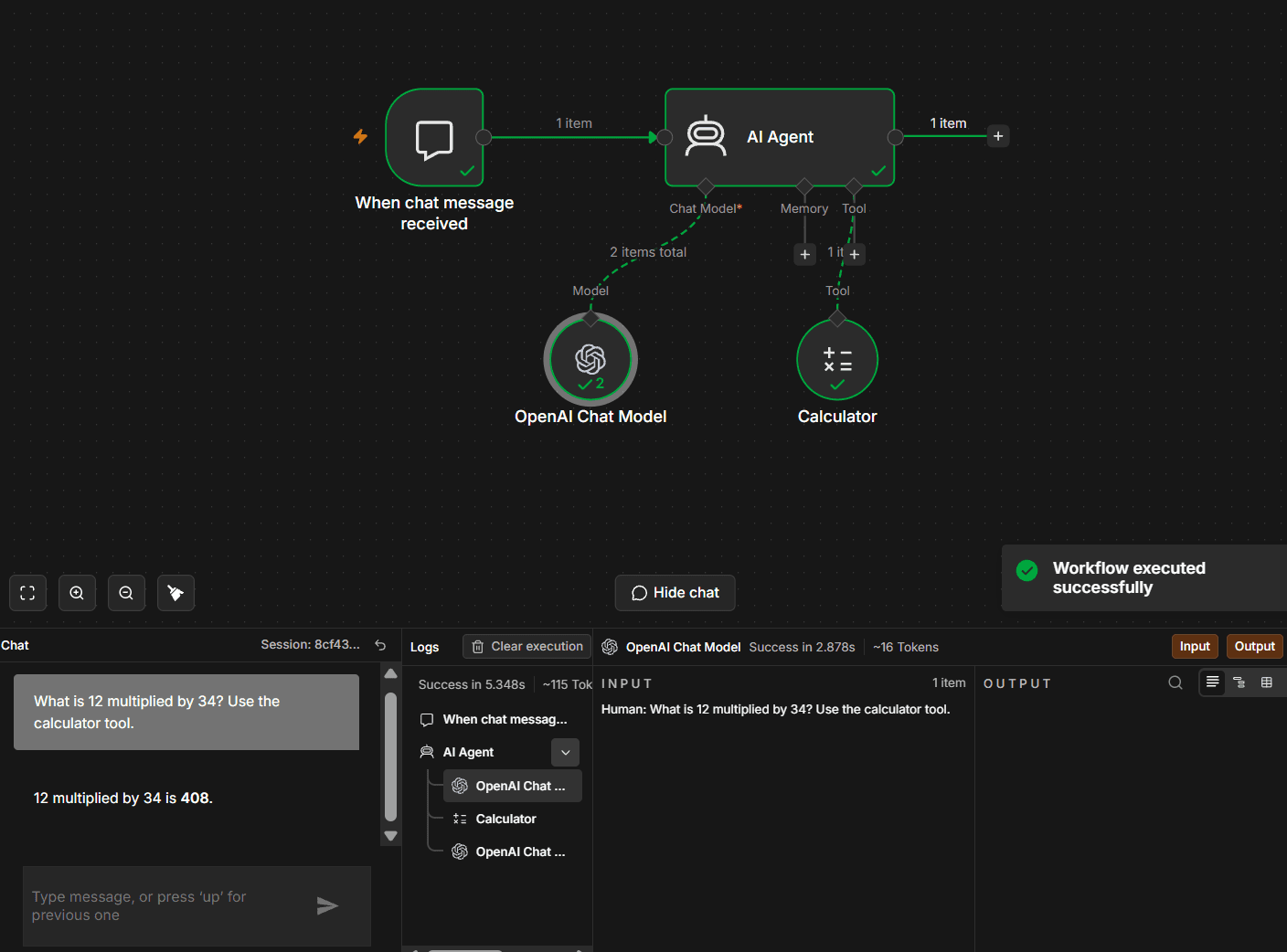
The agent called Calculator and answered 12 multiplied by 34 is 408.
Import the ready-made workflow
Download the workflow, or copy the JSON below and paste it on the n8n canvas with Ctrl+V. Then open OpenAI Chat Model and select your DEVUP AI credential.
{
  "name": "DEVUP AI Agent with Calculator",
  "nodes": [
    {
      "parameters": {
        "options": {}
      },
      "type": "@n8n/n8n-nodes-langchain.chatTrigger",
      "typeVersion": 1.5,
      "position": [
        208,
        320
      ],
      "id": "6a8f7c9e-a488-46fe-a577-e7505c8cf081",
      "name": "When chat message received",
      "webhookId": "63355992-9e13-41df-87d8-d96af86012f6"
    },
    {
      "parameters": {
        "options": {}
      },
      "type": "@n8n/n8n-nodes-langchain.agent",
      "typeVersion": 3.1,
      "position": [
        480,
        320
      ],
      "id": "b2d5191a-981c-4d93-909a-7d31dc058afd",
      "name": "AI Agent"
    },
    {
      "parameters": {
        "model": {
          "__rl": true,
          "mode": "list",
          "value": "deepseek-ai/DeepSeek-V4-Pro"
        },
        "responsesApiEnabled": false,
        "options": {}
      },
      "type": "@n8n/n8n-nodes-langchain.lmChatOpenAi",
      "typeVersion": 1.3,
      "position": [
        368,
        544
      ],
      "id": "d57704e7-47b2-4857-9fc4-1d01b4d3eb83",
      "name": "OpenAI Chat Model"
    },
    {
      "parameters": {},
      "type": "@n8n/n8n-nodes-langchain.toolCalculator",
      "typeVersion": 1,
      "position": [
        608,
        544
      ],
      "id": "47c9e445-515a-480e-9a49-e69ac2a1f608",
      "name": "Calculator"
    }
  ],
  "pinData": {},
  "connections": {
    "When chat message received": {
      "main": [
        [
          {
            "node": "AI Agent",
            "type": "main",
            "index": 0
          }
        ]
      ]
    },
    "OpenAI Chat Model": {
      "ai_languageModel": [
        [
          {
            "node": "AI Agent",
            "type": "ai_languageModel",
            "index": 0
          }
        ]
      ]
    },
    "Calculator": {
      "ai_tool": [
        [
          {
            "node": "AI Agent",
            "type": "ai_tool",
            "index": 0
          }
        ]
      ]
    }
  },
  "settings": {
    "executionOrder": "v1",
    "binaryMode": "separate"
  }
}
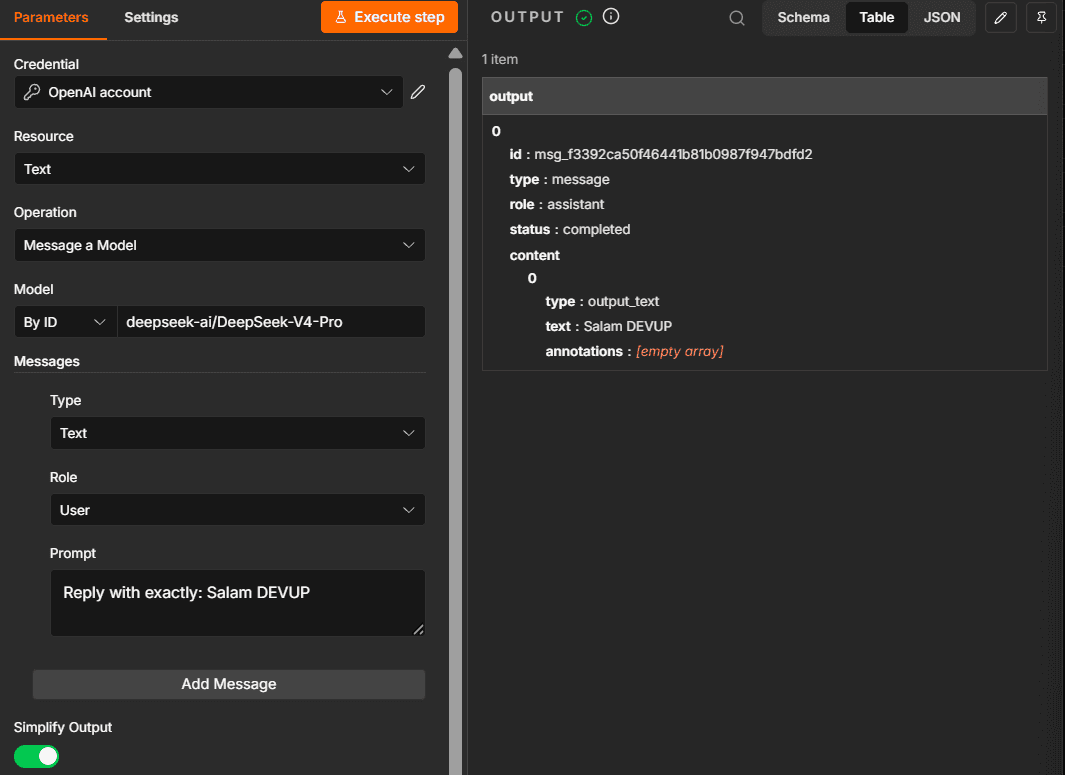
The OpenAI node's Message a model action
The Message a model action of the OpenAI node works with DEVUP AI chat models. Set Model to By ID and enter a catalog ID, such as deepseek-ai/DeepSeek-V4-Pro.
Use DEVUP AI for the n8n Assistant
In the Assistant's Connect a model step, choose Self-hosted or OpenAI-compatible endpoint, enter https://api.devupai.com/v1 and your key, and type an OpenAI model such as openai/gpt-6-luna. The Assistant's next step asks for a code sandbox, which is a separate service run by n8n or Daytona, not DEVUP AI.
Choosing models
Use the exact catalog ID. Tool calling needs a model whose catalog entry supports it. See the Models catalog and Tool Calling guide.
Troubleshooting
- Couldn't connect with these settings:The Base URL still points at the default endpoint. Set it to https://api.devupai.com/v1 and save again.
- The chat echoes your message back as JSON:The chat was opened from inside the Chat Trigger, which runs only that node. Use Open chat below the canvas to run the whole workflow.
- The Assistant's sandbox step returns an unexpected response:The sandbox is a separate service. Enter the URL and key of an n8n Sandbox or Daytona there, not DEVUP AI.
FAQ
Does n8n work with DEVUP AI?
Yes. Create an OpenAI credential with Base URL https://api.devupai.com/v1 and your DEVUP AI key, then use it in the OpenAI Chat Model of an AI Agent.
Do I need to change Use Responses API in the OpenAI Chat Model?
No. DEVUP AI works with Use Responses API on, which is the default, or off.
How is n8n usage billed on DEVUP AI?
Every request your workflows make is a regular DEVUP AI API call, metered in Algerian Dinar on your account.
Can I see DEVUP AI models in n8n's model picker?
Yes. With the credential pointing at DEVUP AI, Model → From list shows the DEVUP AI catalog.
Does the OpenAI node's Message a model action work?
Yes. Set Model to By ID and enter a DEVUP AI catalog ID, such as deepseek-ai/DeepSeek-V4-Pro.
Is there a ready-made workflow?
Yes. Download devup-n8n-ai-agent.json from this page, import it into n8n, and select your DEVUP AI credential.
Related integrations
- LangChain: Chains and agents with LangChain.
- OpenAI SDK: OpenAI SDKs pointed at DEVUP AI.
- Node.js SDK: The official DEVUP AI SDK for Node.js.
- Python: The official OpenAI Python SDK on DEVUP AI.