
Integrations
Cline
Cline is an autonomous coding agent for VS Code. Connect it to DEVUP AI with its OpenAI Compatible provider.
Prerequisites
- VS Code
- The Cline extension (Marketplace ID
saoudrizwan.claude-dev) - A DEVUP AI API key from https://devupai.com/dashboard/api-keys
Configure the provider
Open Cline in VS Code. On initial onboarding, choose Bring my own API key, or click the settings gear icon (⚙️) in the Cline panel. Set API Provider to OpenAI Compatible and fill in the configuration fields:
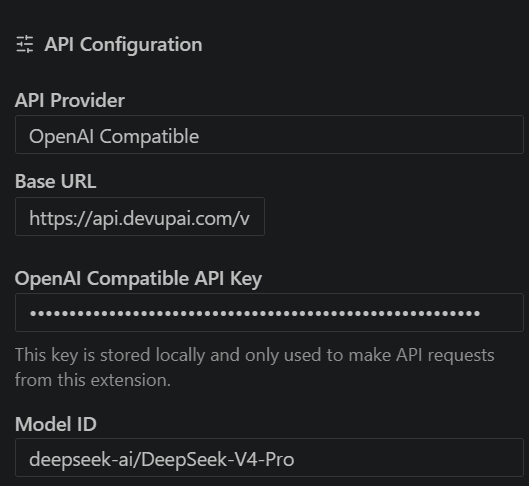
| Field | Value |
|---|---|
| Base URL | https://api.devupai.com/v1 |
| API Key | Your DEVUP AI key, pasted as-is (no Bearer prefix) |
| Model ID | deepseek-ai/DeepSeek-V4-Pro |
Model configuration
Open Model Configuration in the settings panel:
- Set Context Window Size to the model's context limit from the catalog (see Models).
- Uncheck Supports Images for models without vision support.
Run your first task
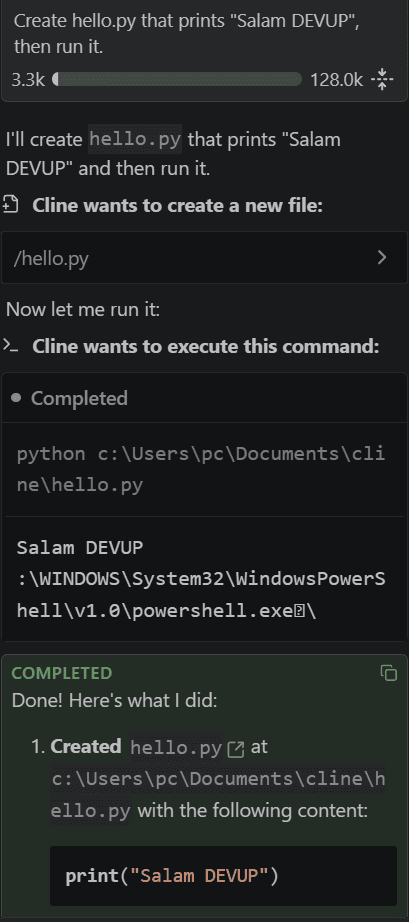
Switch Cline to Act mode and enter the prompt:
text
Create hello.py that prints "Salam DEVUP", then run it.Cline asks for approval, creates the file, and runs it.
Choosing a model
For agent tasks, use a model whose catalog entry supports tool calling, for example deepseek-ai/DeepSeek-V4-Pro. See Tool Calling and Models.
Troubleshooting
- Authentication error (401)Paste the API key as-is, without
Bearerand without spaces. - Model IDCopy it exactly as it appears in the catalog, for example
deepseek-ai/DeepSeek-V4-Pro. - Context shows 128KSet Context Window Size in Model Configuration.