
Integrations
GitHub Copilot CLI
GitHub Copilot CLI is GitHub's coding agent for the terminal. Set three environment variables and it runs on DEVUP AI models: it answers questions, creates files and runs commands, with no GitHub sign-in required.
Requirements
- Node.js and npm, to install Copilot CLI.
- a DEVUP AI API key from https://devupai.com/dashboard/api-keys. Create a dedicated key for Copilot CLI so you can revoke it on its own.
Install Copilot CLI
npm install -g @github/copilotSet your API key
The configuration reads the key from DEVUP_API_KEY. Set it in the terminal where you run Copilot CLI:
PowerShell
$env:DEVUP_API_KEY = "YOUR_DEVUP_API_KEY"Bash
export DEVUP_API_KEY="YOUR_DEVUP_API_KEY"Connect Copilot CLI to DEVUP AI
Set these three variables in the same terminal:
PowerShell
$env:COPILOT_PROVIDER_BASE_URL = "https://api.devupai.com/v1"
$env:COPILOT_PROVIDER_API_KEY = $env:DEVUP_API_KEY
$env:COPILOT_MODEL = "deepseek-ai/DeepSeek-V4-Pro"
Bash
export COPILOT_PROVIDER_BASE_URL="https://api.devupai.com/v1"
export COPILOT_PROVIDER_API_KEY="$DEVUP_API_KEY"
export COPILOT_MODEL="deepseek-ai/DeepSeek-V4-Pro"
Settings
| Variable | Value | What it does |
|---|---|---|
| COPILOT_PROVIDER_BASE_URL | https://api.devupai.com/v1 | Switches Copilot CLI to DEVUP AI as its model provider. |
| COPILOT_PROVIDER_API_KEY | DEVUP_API_KEY | Your DEVUP AI key. |
| COPILOT_MODEL | a catalog model ID | Written exactly as in the catalog, such as deepseek-ai/DeepSeek-V4-Pro. |
These variables last for the current terminal session. Set them again in each new terminal.
Check the connection
copilot -p "Reply with exactly: Salam DEVUP"It prints Salam DEVUP.
Start a session
copilotDescribe the task in plain language, for example: Create a file named greet.py that prints Salam DEVUP, then run it with python.
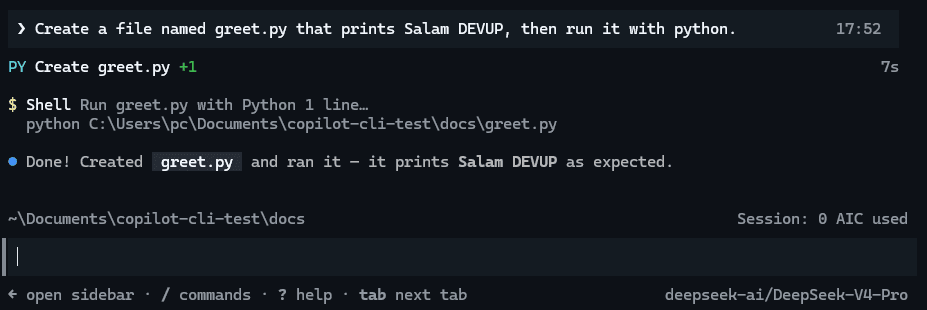
Copilot CLI created greet.py and ran it. The status bar shows the DEVUP AI model and 0 AIC used.
Run a task from a script
-p runs one prompt without the interactive interface. --allow-all-tools lets Copilot CLI create files and run commands without asking, so use it in a folder you trust.
copilot -p "Create a file named hello.py that prints Salam DEVUP, then run it with python." --allow-all-toolsCopilot CLI creates hello.py, runs it and reports Salam DEVUP.
Use GPT-5 models with the Responses API
For GPT-5 series models, switch Copilot CLI to the Responses API and pick the model:
PowerShell
$env:COPILOT_PROVIDER_WIRE_API = "responses"
$env:COPILOT_MODEL = "openai/gpt-5.4-mini"
Bash
export COPILOT_PROVIDER_WIRE_API="responses"
export COPILOT_MODEL="openai/gpt-5.4-mini"
Run the check command again and it prints Salam DEVUP from openai/gpt-5.4-mini.
Work offline from GitHub
Offline mode turns off every connection to GitHub: sign-in, telemetry, web tools, the GitHub MCP server and auto-update. Copilot CLI keeps working on DEVUP AI:
PowerShell
$env:COPILOT_OFFLINE = "true"Bash
export COPILOT_OFFLINE="true"Troubleshooting
- "Model catalog ownership cannot be verified"This notice only turns off model ID suggestions in the /model picker. Copilot CLI uses the model set in COPILOT_MODEL.
- A note about prompt and output token limitsCopilot CLI mentions these settings for models outside its own catalog. The configuration on this page works without them.
FAQ
Does GitHub Copilot CLI work with DEVUP AI?
Yes. Set COPILOT_PROVIDER_BASE_URL to https://api.devupai.com/v1, COPILOT_PROVIDER_API_KEY to your DEVUP AI key and COPILOT_MODEL to a catalog model ID. Copilot CLI then answers, edits files and runs commands on DEVUP AI models.
Do I need a GitHub account or a Copilot plan?
No. With a custom model provider, Copilot CLI does not require GitHub sign-in, and with COPILOT_OFFLINE set to true it makes no connection to GitHub at all.
Does Copilot CLI use my GitHub Copilot credits?
No. Requests go to DEVUP AI, so the session counter shows 0 AIC used, and usage is billed on your DEVUP AI balance.
Which models can I use?
Any model ID from the DEVUP AI catalog, written exactly as listed, such as deepseek-ai/DeepSeek-V4-Pro. For GPT-5 series models such as openai/gpt-5.4-mini, also set COPILOT_PROVIDER_WIRE_API to responses.
Can I run Copilot CLI from a script?
Yes. copilot -p runs one prompt without the interactive interface. Add --allow-all-tools when the task needs to create files or run commands.
How is this different from Copilot in VS Code?
Copilot CLI runs in the terminal and reads its settings from environment variables. For Copilot chat inside VS Code, see the VS Code guide.
Related integrations
- Codex CLI: Run OpenAI's Codex CLI on DEVUP AI models through config.toml.
- OpenCode: Add DEVUP AI to OpenCode as a custom OpenAI-compatible provider in opencode.json.
- Aider: Connect Aider to DEVUP AI with OPENAI_API_BASE, OPENAI_API_KEY and an openai/ model prefix.
- VS Code: Add DEVUP AI models to VS Code chat through the built-in Custom Endpoint, with no extension.